
An older woman smiling as she slices vegetables at a sunny kitchen counter.

For families who help a parent

One medication list your whole family can trust

Reminders, a record of every dose, and a clear list of what changed after each appointment. You choose who in the family sees it.

Free to start. Safety features are always free.

  • Download on the App Store
  • Get it on Google Play

Privacy and safety

How SwyftMeds handles your information

Your family's health records are personal. These are the promises we keep, in plain words.

Read our privacy promise

  • You choose who sees it

    Each person in your Care Circle sees only what you allow.

  • Reviewed by pharmacists

    Medication information is checked by pharmacists.

  • Never sold or rented

    We do not sell or rent your health data.

  • Safety features always free

    Allergy flags, the Emergency Card and export.

After every appointment

Know what changed, before it reaches the pill box

After Mom's cardiology visit, there is no need to compare papers at the kitchen table. The list stays right for everyone who helps.
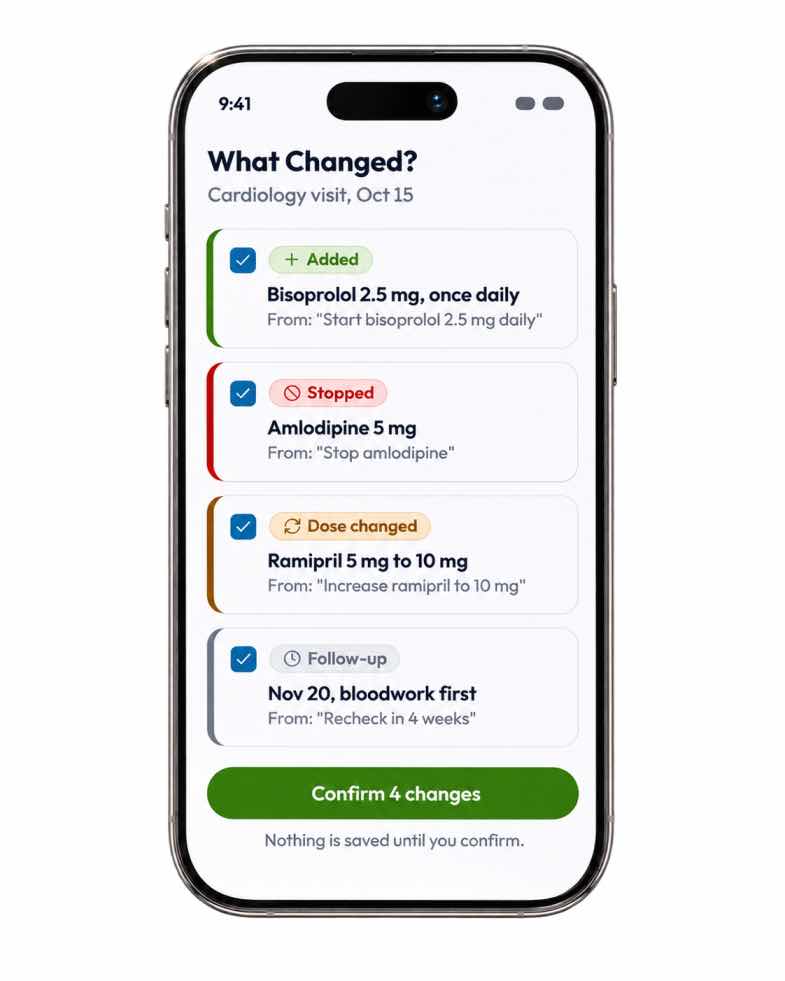
  1. Photograph the visit summary, or paste the notes.
  2. SwyftMeds lists each medication that was added, stopped or changed, with the line it came from.
  3. You tick the ones that are right and confirm. Nothing is saved until you do.
An iPhone showing the What Changed? screen after a cardiology visit: Bisoprolol added, Amlodipine stopped, Ramipril changed from 5 mg to 10 mg and a follow-up on Nov 20, with a Confirm 4 changes button.

For the family

Is Mom OK today? One glance answers it

When a dose is marked taken, the family members your parent chooses see it too. You hear from SwyftMeds when something needs attention, not every time a dose is due.

A younger man holds the hands of a smiling older woman as they talk.
A hand holding a phone that shows the SwyftMeds Today screen: two morning doses taken and an evening dose with a Mark taken button. Example screen.

For the person taking them

A Today screen that is easy to read and easy to use

Walter sees what to take and when, with one Mark taken button for each dose. It works on a phone, a tablet or a computer.

  1. Doses grouped by time of day.
  2. Senior Mode makes the text a quarter larger and every button bigger.
  3. Read today aloud, for days when small print is hard to see.

Setting it up for yourself?

  • Download on the App Store
  • Get it on Google Play

Getting started

Set up in about five minutes

  1. Step 1

    Add a person

    Yourself, or a parent you help.
  2. Step 2

    Add medications

    Type them in, or upload a pharmacy label.
  3. Step 3

    Choose reminder times

    Morning, evening, or whatever fits the day.
  4. Step 4

    Invite family

    A sibling, a partner or a home-care worker.
  5. Step 5

    Choose what they see

    Each person sees only what you allow.

Ready to start?

Set up one medication list in about five minutes. The free plan needs no credit card, and safety features are always free.

Need more information?

Talk to a person, read a setup guide, or look up a question. A free 20-minute setup session is open to any senior.

Help centre

Setup guides and answers to common questions.

Contact us

Call during support hours, or send a message.

Guides

Plain-language guides, each reviewed by a pharmacist.